<?xml version="1.0" encoding="utf-8"?><feed xmlns="http://www.w3.org/2005/Atom" ><generator uri="https://jekyllrb.com/" version="4.3.2">Jekyll</generator><link href="https://www.unikey.org/en/feed.xml" rel="self" type="application/atom+xml" /><link href="https://www.unikey.org/en/" rel="alternate" type="text/html" /><updated>2025-06-10T01:29:40+07:00</updated><id>https://www.unikey.org/en/feed.xml</id><title type="html">UniKey</title><subtitle>Official website for UniKey Vietnamese keyboard. Developed by Pham Kim Long. UniKey runs in Windows, Linux, macOS X, iOS.</subtitle><entry><title type="html">UniKey Windows ARM64</title><link href="https://www.unikey.org/en/unikey_arm64.html" rel="alternate" type="text/html" title="UniKey Windows ARM64" /><published>2025-06-08T00:00:00+07:00</published><updated>2025-06-08T00:00:00+07:00</updated><id>https://www.unikey.org/en/unikey_arm64</id><content type="html" xml:base="https://www.unikey.org/en/unikey_arm64.html"><![CDATA[<p>June 8, 2025: Version 4.6 RC2 ARM64 released.</p>
<ul>
  <li>Use this native ARM64 build if you are using Windows 11 with Snapdragon processors, such as X Elite, X Plus… (Surface laptop, Surface Pro)</li>
  <li>This should give better performance than running x64 build in emulation mode.</li>
</ul>

<p><a href="https://www.unikey.org/en/download.html">Download UniKey 4.6 RC2</a></p>

<p>When running Unikey ARM64, you can open Task Manager - Details, look at the Architecture column to see that UniKey is running in Arm64, as below.</p>

<p><img src="/en/assets/images/unikey_arm.png" alt="UniKey Arm64" /></p>]]></content><author><name></name></author><summary type="html"><![CDATA[June 8, 2025: Version 4.6 RC2 ARM64 released. Use this native ARM64 build if you are using Windows 11 with Snapdragon processors, such as X Elite, X Plus… (Surface laptop, Surface Pro) This should give better performance than running x64 build in emulation mode.]]></summary></entry><entry><title type="html">UniKey 4.6 RC2 Release</title><link href="https://www.unikey.org/en/version_4_6_2.html" rel="alternate" type="text/html" title="UniKey 4.6 RC2 Release" /><published>2023-09-29T00:00:00+07:00</published><updated>2023-09-29T00:00:00+07:00</updated><id>https://www.unikey.org/en/version_4_6_2</id><content type="html" xml:base="https://www.unikey.org/en/version_4_6_2.html"><![CDATA[<p>Version 4.6 RC2 released on September 29, 2023 with a minor update:</p>
<ul>
  <li>Add <em>Simple Telex</em> as a built-in input method. This method will not convert <strong>W</strong> key to <strong>ư</strong> if it is the first key in a word. (<strong>W</strong> is converted only when it is preceeded by <strong>U</strong>, <strong>O</strong> or <strong>A</strong>).</li>
  <li>Previously, <em>Simple Telex</em> is available only when you select the <em>user-defined</em> input method and load the sample <em>Simplified Telex</em> as your preferred input method.</li>
</ul>

<p><a href="https://www.unikey.org/en/download.html">Download UniKey 4.6 RC2</a></p>]]></content><author><name></name></author><summary type="html"><![CDATA[Version 4.6 RC2 released on September 29, 2023 with a minor update: Add Simple Telex as a built-in input method. This method will not convert W key to ư if it is the first key in a word. (W is converted only when it is preceeded by U, O or A). Previously, Simple Telex is available only when you select the user-defined input method and load the sample Simplified Telex as your preferred input method.]]></summary></entry><entry><title type="html">UniKey 4.6 RC1 Release</title><link href="https://www.unikey.org/en/version_4_6_1.html" rel="alternate" type="text/html" title="UniKey 4.6 RC1 Release" /><published>2023-09-15T00:00:00+07:00</published><updated>2023-09-15T00:00:00+07:00</updated><id>https://www.unikey.org/en/version_4_6_1</id><content type="html" xml:base="https://www.unikey.org/en/version_4_6_1.html"><![CDATA[<p>Version 4.6 RC1 released on September 15, 2023 with an important feature <strong>Per app On/Off Mode</strong>:</p>
<ul>
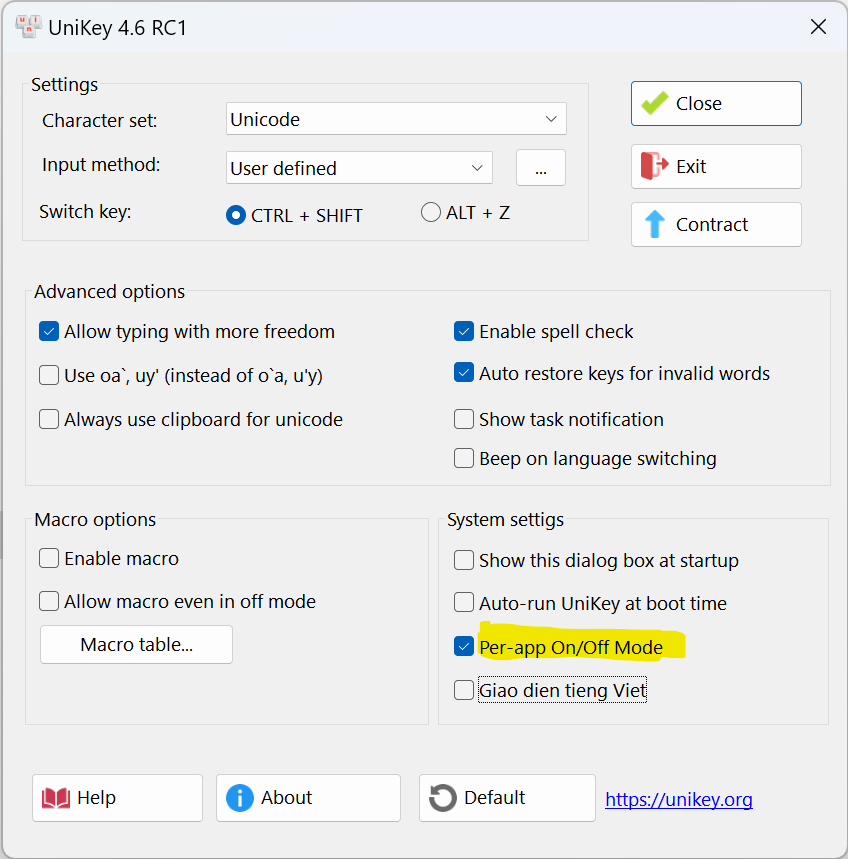
  <li>When enabled, UniKey will automatically remember and select keyboard mode for each application individually.</li>
  <li>When you switch keyboard mode for an application, UniKey will remember the mode you selected. Whenever you switch back to the application, UniKey will set keyboard to the mode that you last selected for the application.</li>
</ul>

<p>You can enable <em>Per app On/Off Mode</em> as follows:</p>

<p><img src="/en/assets/images/per_app_settings_english.png" alt="Per app On/Off Mode" /></p>

<p><a href="https://www.unikey.org/en/download.html">Download UniKey 4.6 RC1</a></p>]]></content><author><name></name></author><summary type="html"><![CDATA[Version 4.6 RC1 released on September 15, 2023 with an important feature Per app On/Off Mode: When enabled, UniKey will automatically remember and select keyboard mode for each application individually. When you switch keyboard mode for an application, UniKey will remember the mode you selected. Whenever you switch back to the application, UniKey will set keyboard to the mode that you last selected for the application.]]></summary></entry><entry><title type="html">UniKey 4.5 RC1 Release</title><link href="https://www.unikey.org/en/version_4_5_1.html" rel="alternate" type="text/html" title="UniKey 4.5 RC1 Release" /><published>2023-08-24T00:00:00+07:00</published><updated>2023-08-24T00:00:00+07:00</updated><id>https://www.unikey.org/en/version_4_5_1</id><content type="html" xml:base="https://www.unikey.org/en/version_4_5_1.html"><![CDATA[<p>Version 4.5 RC1 released on August 24, 2023 with lots of fixes</p>
<ul>
  <li>Fixed bugs in storing &amp; loading macro file.</li>
  <li>Improve UI for high-resolution screens.</li>
  <li>New UniKey tray icons.</li>
  <li>Won’t add Vietnamese language layout.</li>
  <li>Don’t add shortcut if toast notification is not enabled.</li>
</ul>

<p><a href="https://www.unikey.org/en/download.html">Download UniKey 4.5 RC1</a></p>]]></content><author><name></name></author><summary type="html"><![CDATA[Version 4.5 RC1 released on August 24, 2023 with lots of fixes Fixed bugs in storing &amp; loading macro file. Improve UI for high-resolution screens. New UniKey tray icons. Won’t add Vietnamese language layout. Don’t add shortcut if toast notification is not enabled.]]></summary></entry><entry><title type="html">UniKey 4.3 RC5 Release</title><link href="https://www.unikey.org/en/version_4_3_5.html" rel="alternate" type="text/html" title="UniKey 4.3 RC5 Release" /><published>2020-10-15T00:00:00+07:00</published><updated>2020-10-15T00:00:00+07:00</updated><id>https://www.unikey.org/en/version_4_3_5</id><content type="html" xml:base="https://www.unikey.org/en/version_4_3_5.html"><![CDATA[<p>Version 4.3 RC5 released on October 15, 2020 with some minor fixes</p>

<ul>
  <li>Add option to enable/disable beeping sound when switching between languages</li>
  <li>Better support for the new Microsoft’s Edge browser (correctly change or delete previous characters when there is a text suggestion).</li>
</ul>

<p><a href="https://www.unikey.org/en/download.html">Download UniKey 4.3 RC5</a></p>]]></content><author><name></name></author><summary type="html"><![CDATA[Version 4.3 RC5 released on October 15, 2020 with some minor fixes]]></summary></entry><entry><title type="html">UniKey 4.3 RC4 Release</title><link href="https://www.unikey.org/en/version_4_3_4.html" rel="alternate" type="text/html" title="UniKey 4.3 RC4 Release" /><published>2018-07-14T00:00:00+07:00</published><updated>2018-07-14T00:00:00+07:00</updated><id>https://www.unikey.org/en/version_4_3_4</id><content type="html" xml:base="https://www.unikey.org/en/version_4_3_4.html"><![CDATA[<p>Version 4.3 RC4 released on July 14, 2018 with some minor fixes</p>

<ul>
  <li>Not able to type Vietnamese for certain kinds of apps (console, game, UWP apps).</li>
  <li>Support for Opera (correctly change or delete previous characters when there is a text suggestion).</li>
</ul>

<p><a href="https://www.unikey.org/en/download.html">Download UniKey 4.3 RC4</a></p>]]></content><author><name></name></author><summary type="html"><![CDATA[Version 4.3 RC4 released on July 14, 2018 with some minor fixes]]></summary></entry><entry><title type="html">UniKey 4.3 RC3 Release</title><link href="https://www.unikey.org/en/version_4_3_3.html" rel="alternate" type="text/html" title="UniKey 4.3 RC3 Release" /><published>2018-07-02T00:00:00+07:00</published><updated>2018-07-02T00:00:00+07:00</updated><id>https://www.unikey.org/en/version_4_3_3</id><content type="html" xml:base="https://www.unikey.org/en/version_4_3_3.html"><![CDATA[<p>Version 4.3 RC3 released on July 2, 2018 with fixes for Excel and browsers’ address bar.</p>

<p>Bug fix:</p>
<ul>
  <li>Not completely changed or deleted previous characters in Excel or the address
bar of browsers when there is a text suggestion. Example: [sang] + [s] = [saáng]</li>
  <li>Working correctly in Excel, and all browsers, including: Chrome, Firefox, Edge, Internet Explorer.</li>
  <li>Previous build 4.3 RC2, released on July 1, 2018 has a serious bug in Edge (not possible to type
Vietnamese inside pages). This bug has been fixed in 4.3 RC3.</li>
</ul>

<p><a href="https://www.unikey.org/en/download.html">Download UniKey 4.3 RC3</a></p>]]></content><author><name></name></author><summary type="html"><![CDATA[Version 4.3 RC3 released on July 2, 2018 with fixes for Excel and browsers’ address bar.]]></summary></entry><entry><title type="html">UniKey 4.3 Release</title><link href="https://www.unikey.org/en/version_4_3.html" rel="alternate" type="text/html" title="UniKey 4.3 Release" /><published>2018-06-23T00:00:00+07:00</published><updated>2018-06-23T00:00:00+07:00</updated><id>https://www.unikey.org/en/version_4_3</id><content type="html" xml:base="https://www.unikey.org/en/version_4_3.html"><![CDATA[<p>Version 4.3 RC1 released on June 23, 2018 with some important updates.</p>

<ul>
  <li>
    <p>Digitally signed with a valid certificate. From now on, you can always check if your UniKey program is safe to use.</p>

    <p><a href="https://www.unikey.org/en/certificate.html">More information on UniKey’s signature</a></p>
  </li>
  <li>Bug fixes to allow typing in Edge browser</li>
  <li>Fixed bug that caused macro file empty.</li>
  <li>Improvements for macro:
    <ul>
      <li>You can define up to 8192 macro entries</li>
      <li>New option to enable/disable auto-upcasing of macro replacement text.</li>
    </ul>
  </li>
</ul>

<p><a href="https://www.unikey.org/en/download.html">Download UniKey 4.3 RC1</a></p>]]></content><author><name></name></author><summary type="html"><![CDATA[Version 4.3 RC1 released on June 23, 2018 with some important updates.]]></summary></entry><entry><title type="html">Tự động chạy UniKey với quyền admin</title><link href="https://www.unikey.org/en/autostart-admin.html" rel="alternate" type="text/html" title="Tự động chạy UniKey với quyền admin" /><published>2018-06-09T00:00:00+07:00</published><updated>2018-06-09T00:00:00+07:00</updated><id>https://www.unikey.org/en/start-admin</id><content type="html" xml:base="https://www.unikey.org/en/autostart-admin.html"><![CDATA[<p>Các bước để chạy UniKey với quyền administrator bằng cách dùng Task Scheduler</p>

<ol>
  <li>Tắt “Khởi động cùng Windows” trong UniKey. Sau đó tắt UniKey.</li>
  <li>Chạy Task Scheduler (bấm nút Start, sau đó gõ Task Scheduler).</li>
  <li>Tạo basic task với các lựa chọn sau:
    <ul>
      <li><em>Trigger</em>: When I log on</li>
      <li><em>Action</em>: Start a program. Sau đó chọn đường dẫn đến UniKeyNT.exe</li>
      <li><em>Finish</em>. Sau đó chọn tiếp Properties của Task để thêm các thông số sau:</li>
      <li><em>General</em>: Run with highest privileges.</li>
      <li><em>Triggers - Edit</em>: Chọn “Delay task for: 30 seconds” (Nếu không chọn phần này thì UniKey sẽ được khởi động mà không có icon ở góc).</li>
      <li><em>Condition</em>: Nếu là máy laptop thì BỎ lựa chọn “Start the task only if the computer is on AC power”.</li>
    </ul>
  </li>
</ol>

<p>Logout, sau đó login, UniKey sẽ được chạy với quyền admin 30 giây sau khi login.</p>]]></content><author><name></name></author><summary type="html"><![CDATA[Các bước để chạy UniKey với quyền administrator bằng cách dùng Task Scheduler]]></summary></entry><entry><title type="html">UniKey’s Digital Signature</title><link href="https://www.unikey.org/en/certificate.html" rel="alternate" type="text/html" title="UniKey’s Digital Signature" /><published>2018-05-30T00:00:00+07:00</published><updated>2018-05-30T00:00:00+07:00</updated><id>https://www.unikey.org/en/certificate</id><content type="html" xml:base="https://www.unikey.org/en/certificate.html"><![CDATA[<p>Starting from version 4.3 onward, all UniKey releases will be digitally signed with my certificate, which can be verified by Windows.</p>

<p>Having a digitally signed UniKey guarantees:</p>
<ul>
  <li>Your UniKey progam comes from Pham Kim Long and has not been altered.</li>
  <li>You won’t be warned by Windows Defender SmartScreen about using an unknown and potetially harmful program</li>
</ul>

<h2 id="windows-defenders-smartscreen">Windows Defender’s SmartScreen</h2>
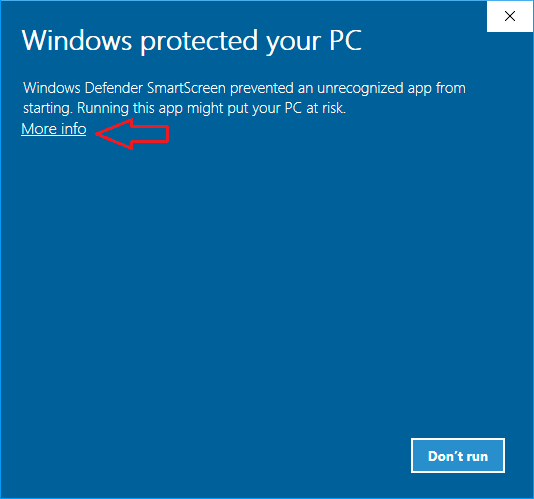
<p>When running UniKey (that has just been released and signed recently) for the first time, you may see a warning in the SmartScreen of Windows Defender as below:</p>

<p><img src="/en/assets/images/smartscreen.png" alt="smartscreen" /></p>

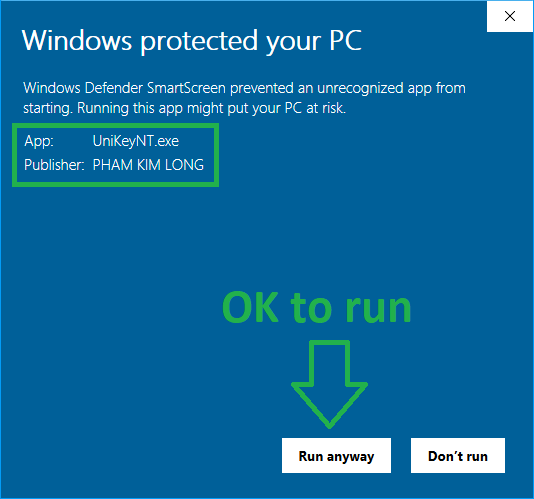
<p>Click “More Info” to check the signature of UniKey as below:</p>

<p><img src="/en/assets/images/smartscreen-ok.png" alt="smartscreen-publisher" /></p>

<p>If you see this text <strong>Publisher: PHAM KIM LONG</strong>, you can be sure you are using a “clean” UniKey program.</p>

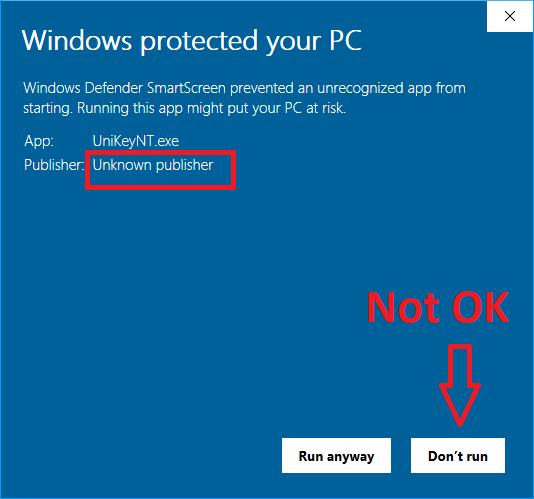
<p>If you see <strong>Publisher: Unknown publisher</strong> as shown below, DON’T use it.</p>

<p><img src="/en/assets/images/smartscreen-unknown.png" alt="smartscreen-unknown" /></p>

<h3 id="note">Note</h3>
<p>For each digitally signed UniKey release, after some period of time when the number of users reach a certain level (defined by Windows Defender), that release will achieve a “good” reputation. From then on, users won’t be warned about “unrecognized app” by Windows Defender anymore. So, if you run UniKey for the first time and don’t see the SmartScreen, you can be sure the program is safe and has not been altered by anyone.</p>

<h2 id="how-to-check-unikeys-digital-signature">How to check UniKey’s digital signature?</h2>
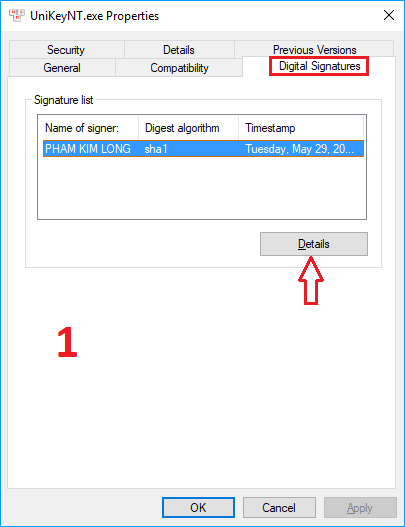
<p>If in doubt, you can check the digital signature and certificate of UniKey program as follows:</p>

<ul>
  <li>Open Windows Explorer, locate the file <em>UniKeyNT.exe</em></li>
  <li>Right click on <em>UniKeyNT.exe</em>, select <em>Properties</em> from the context menu, and then select the <em>Digital Signatures</em> tab.</li>
</ul>

<p><img src="/en/assets/images/properties-1.png" alt="Properties-1" /></p>
<ul>
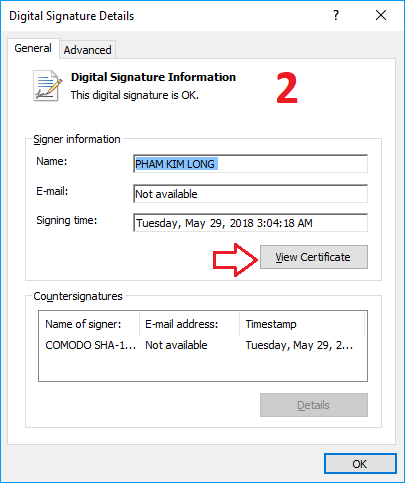
  <li>Click <em>Details</em>:</li>
</ul>

<p><img src="/en/assets/images/properties-2.png" alt="Properties-2" /></p>
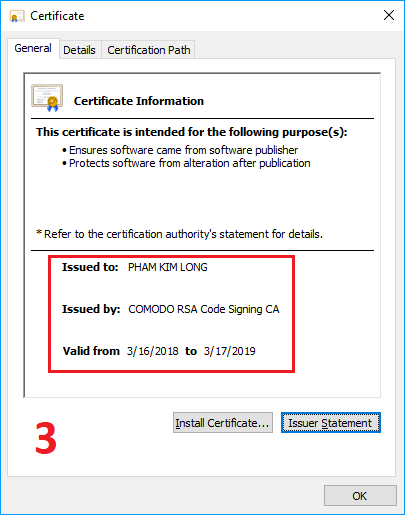
<ul>
  <li>Click <em>View Certificate</em> button:</li>
</ul>

<p><img src="/en/assets/images/properties-3.png" alt="Properties-3" /></p>]]></content><author><name></name></author><summary type="html"><![CDATA[Starting from version 4.3 onward, all UniKey releases will be digitally signed with my certificate, which can be verified by Windows.]]></summary></entry></feed>